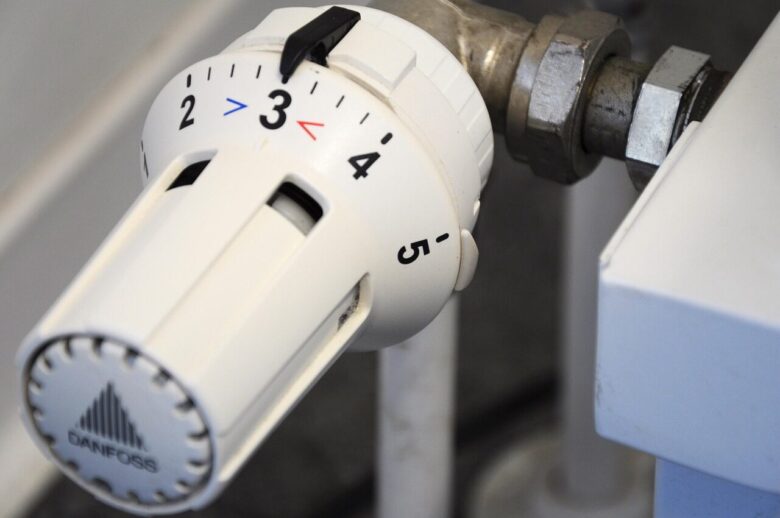
The best smart thermostat settings for comfort and lower bills are the ones that match your routine, your home’s heating and cooling system, and how quickly your rooms gain or lose temperature. A smart thermostat can help, but the savings do not come from the device alone. They come from using schedules, away modes, temperature setbacks, and comfort limits in a way that fits real life.
Many people install a smart thermostat and leave the default settings untouched. Others make the opposite mistake: they create aggressive schedules that make the home uncomfortable, then override the thermostat every day. The better approach is simple: start with reasonable temperature targets, observe how your home responds for one or two weeks, and adjust gradually.
This guide explains practical smart thermostat settings for winter, summer, sleep, work hours, vacations, and households with different comfort needs. It also covers common mistakes that can raise energy bills instead of lowering them.
Important note: before changing advanced thermostat settings, confirm that your smart thermostat is compatible with your HVAC system. Heat pumps, electric resistance heating, radiant floors, and multi-stage systems may need different settings. If your system behaves strangely after a change, check the manufacturer’s manual or contact a licensed HVAC technician.
Best Smart Thermostat Settings for Daily Comfort
For many homes, a good starting point is to keep the thermostat around 68°F to 70°F during winter when people are awake, and around 76°F to 78°F during summer when cooling is needed. These are not strict rules. They are practical starting ranges that balance comfort with energy use.
If your thermostat uses Celsius, that is roughly 20°C to 21°C for winter comfort and 24°C to 26°C for summer cooling. The exact number depends on humidity, insulation, sunlight, clothing, ceiling fans, and how sensitive people in the home are to temperature changes.
A useful way to think about thermostat settings is this: the bigger the difference between indoor and outdoor temperature, the harder your system usually has to work. In winter, setting the heat slightly lower can reduce energy use. In summer, allowing the home to be a little warmer can reduce cooling demand.
| Situation | Suggested Starting Setting | Practical Adjustment |
|---|---|---|
| Winter daytime at home | 68°F to 70°F | Lower by 1°F at a time if everyone remains comfortable. |
| Winter sleeping hours | 62°F to 66°F | Use warmer bedding before raising the heat too much. |
| Summer daytime at home | 76°F to 78°F | Use fans and humidity control to improve comfort. |
| Summer sleeping hours | 72°F to 76°F | Adjust based on humidity and bedroom airflow. |
| Away for several hours | 7°F to 10°F setback when suitable | Avoid aggressive setbacks for systems that recover slowly. |
How to Set a Smart Thermostat Schedule That Actually Works
The best schedule is not the most complicated one. It is the schedule that matches when people are usually home, asleep, away, and returning. Smart thermostats often allow several daily temperature changes, but too many small changes can make the system cycle more than necessary.
Start with four basic periods: wake, away, home, and sleep. If your household has irregular hours, use occupancy sensing or geofencing carefully instead of forcing a rigid schedule. In many cases, a simple schedule plus manual fine-tuning is more reliable than a fully automated setup that guesses incorrectly.
-
Set your comfortable home temperature first.
Choose a temperature that feels acceptable without relying on constant manual overrides. This becomes your baseline. If the baseline is too uncomfortable, you will keep changing it, and the schedule will not work.
-
Create a sleep setting.
In winter, many households can sleep comfortably with the thermostat several degrees lower. In summer, bedrooms may need slightly cooler settings if humidity is high or airflow is poor. The goal is comfort without conditioning unused parts of the home more than necessary.
-
Add an away setting only when the home is empty long enough.
If everyone is gone for several hours, a setback can help reduce energy use. If someone returns after a short errand, a large setback may not be worth it because the system will need to recover soon after.
-
Use smart recovery features when available.
Many smart thermostats can learn how long your home takes to reach the target temperature. This helps the system start early enough for comfort without forcing you to set extreme temperatures.
-
Review energy reports weekly at first.
Look for patterns. If heating or cooling runs heavily right after every setback, your schedule may be too aggressive. If the system runs often while nobody is home, your away settings may be too mild.
Winter Settings: Lower Bills Without Making the House Feel Cold
In winter, small thermostat changes can make a noticeable difference because heating often accounts for a large part of household energy use. The U.S. Department of Energy notes that setting the thermostat back 7°F to 10°F for 8 hours a day can save up to 10% a year on heating and cooling in many homes.
A practical winter setup is to keep the home around 68°F when occupied, lower it during sleep, and use a stronger setback when the house is empty for a long period. If 68°F feels too cold, try improving comfort before raising the thermostat: wear warmer clothing indoors, use heavier bedding, check for drafts, and keep supply vents clear.
One detail people often ignore is recovery time. If your home loses heat quickly, setting the thermostat very low overnight may make mornings uncomfortable. Instead of a large setback, try lowering the temperature by 3°F to 5°F and see whether comfort improves without losing the energy benefit completely.
Summer Settings: Stay Cool Without Overworking the AC
In summer, the goal is to keep the home as warm as comfortably possible while still controlling humidity. A common starting range is 76°F to 78°F when people are home. If the air feels sticky, the issue may be humidity rather than temperature alone.
Ceiling fans can make a room feel cooler, but they cool people, not empty rooms. That means fans should be turned off when nobody is using the space. If your smart thermostat supports fan circulation settings, use them carefully. Running the fan constantly may help even out temperature in some homes, but it can also increase electricity use or affect humidity depending on the system.
A common mistake is setting the air conditioner much colder than needed after coming home to a warm house. This usually does not cool the home faster. It simply makes the system keep running longer, which can lead to overcooling and higher bills.
When Smart Features Help and When They Get in the Way
Smart thermostats can learn patterns, detect occupancy, use geofencing, provide energy reports, and adjust automatically. These features are useful when they match your routine. They become frustrating when the home has unpredictable schedules, weak Wi-Fi, pets that affect occupancy sensors, or family members with different comfort needs.
Geofencing can be helpful for people who leave and return at different times each day. The thermostat uses phone location to switch between home and away modes. The main caution is that every regular occupant should be included. If only one phone controls the home, the thermostat may enter away mode while someone else is still inside.
Learning schedules can also be useful, but check them after the first week. If the thermostat learned from unusual behavior, such as a holiday week or guests staying over, the schedule may not represent your normal routine.
- Turn on geofencing only if every regular occupant is included.
- Review auto-created schedules before trusting them long term.
- Use eco or away mode for long empty periods, not quick trips.
- Check energy reports for unusual spikes after schedule changes.
- Keep the thermostat connected to stable Wi-Fi for remote control and updates.
Special Cases: Heat Pumps, Radiant Floors, and Older Systems
Not every HVAC system responds well to the same thermostat strategy. Heat pumps, for example, are efficient because they move heat instead of creating it directly. In heating mode, large setbacks can sometimes trigger backup electric resistance heat, which may reduce or cancel savings.
For many heat pump homes, a steadier temperature is often better than aggressive temperature swings. If your thermostat has heat pump balance, auxiliary heat lockout, or adaptive recovery settings, read the manufacturer’s guidance before changing them.
Radiant floor heating and steam systems can also respond slowly. If your system takes hours to change room temperature, sudden schedule changes may cause discomfort. In these homes, smaller setbacks and earlier recovery times usually work better than dramatic temperature changes.
| System Type | Best Setting Approach | What to Avoid |
|---|---|---|
| Conventional furnace | Use scheduled setbacks for sleep and away periods. | Avoid blocked vents and extreme recovery demands. |
| Central air conditioner | Raise the setting when away and cool before return. | Do not set very low temperatures to cool faster. |
| Heat pump | Use moderate, steady settings when recommended. | Avoid settings that frequently trigger auxiliary heat. |
| Radiant floor heating | Use gradual changes and longer planning windows. | Avoid rapid up-and-down schedules. |
| Electric baseboard | Use room-by-room zoning when possible. | Do not use an incompatible low-voltage thermostat. |
Common Smart Thermostat Mistakes That Increase Bills
A smart thermostat can save energy, but only if it is configured correctly. One common mistake is installing it in a poor location. If the thermostat is near sunlight, drafts, exterior doors, appliances, or blocked airflow, it may read the room incorrectly and run the system at the wrong times.
Another mistake is using manual overrides every day. Occasional overrides are normal, but constant overrides usually mean the schedule is wrong. Instead of fighting the thermostat, adjust the schedule so it reflects how the home is actually used.
It is also important not to ignore maintenance. A dirty air filter, blocked return vent, leaking duct, or low refrigerant issue can make even the best thermostat settings feel ineffective. If your HVAC system runs constantly but the home does not reach the set temperature, the thermostat may not be the real problem.
- Avoid placing heat-producing electronics near the thermostat.
- Do not block the thermostat with furniture, curtains, or shelves.
- Replace or clean HVAC filters on the schedule recommended for your system.
- Do not use extreme temperatures as a shortcut for faster heating or cooling.
- Check whether auxiliary heat is running often if you use a heat pump.
How to Fine-Tune Settings After the First Week
After one week, review comfort and runtime instead of judging the settings by one unusually hot or cold day. Smart thermostat apps often show how many hours the system ran, when it used energy-saving modes, and whether manual overrides were frequent.
If the home feels comfortable but the system runs too often, adjust by 1°F at a time. Small changes are easier to evaluate. If you change five settings at once, it becomes hard to know which change helped or hurt.
If the home feels uncomfortable in only one room, the solution may not be a thermostat change. It could be airflow, insulation, sun exposure, closed doors, or duct balance. In that case, lowering or raising the whole-home setting may waste energy while still failing to fix the problem room.
When to Call a Professional
Call an HVAC professional if the system short cycles, cannot reach the set temperature, frequently switches to auxiliary heat, blows air that does not feel heated or cooled, or behaves differently after thermostat installation. These signs may point to wiring, compatibility, refrigerant, airflow, or equipment issues.
You should also get help if your thermostat wiring includes unfamiliar labels, high-voltage wiring, or multiple stages that are not clearly explained in the manual. Installing a smart thermostat incorrectly can damage equipment or create unreliable heating and cooling behavior.
If your energy bills rise sharply after installing a smart thermostat, compare the new schedule with the old one. Sometimes the device is working correctly, but the settings are keeping the home more comfortable for longer hours than before.
Conclusion
The best smart thermostat settings for comfort and lower bills start with moderate temperatures, realistic schedules, and gradual adjustments. For many homes, that means around 68°F to 70°F in winter when occupied, around 76°F to 78°F in summer when cooling is needed, and sensible setbacks during sleep or long away periods.
The key is not to chase the lowest possible bill at the expense of daily comfort. A smart thermostat works best when it supports your routine, avoids unnecessary heating and cooling, and gives you enough data to make small improvements over time.
If your system is a heat pump, radiant floor setup, electric baseboard heater, or older HVAC unit, check the manufacturer’s guidance before using aggressive setbacks. The right setting is the one that keeps the home comfortable without making the equipment work harder than necessary.
FAQ
1. What is the most energy-efficient smart thermostat setting?
There is no single perfect setting for every home, but a practical starting point is around 68°F in winter when awake and around 76°F to 78°F in summer when cooling is needed. The most efficient setting is usually the mildest one your household can tolerate comfortably.
2. Should I turn my thermostat off when I leave home?
Usually, it is better to use away mode or an energy-saving setback instead of turning the system completely off. This helps protect comfort, humidity control, and indoor conditions. For long vacations, use a vacation mode that keeps the home within safe temperature limits.
3. Why does my bill stay high after installing a smart thermostat?
The thermostat may not be the main issue. High bills can come from poor insulation, dirty filters, duct leaks, extreme weather, long runtimes, aggressive recovery periods, or incorrect settings. Review your schedule, energy reports, and HVAC maintenance before assuming the device is faulty.
4. Are smart thermostat setbacks good for heat pumps?
Heat pumps often work best with moderate, steady settings, especially in heating mode. Large setbacks may trigger auxiliary heat in some systems, which can use more energy. Check your thermostat’s heat pump settings and your equipment manual before applying large temperature changes.
Official References
- U.S. Department of Energy — Programmable Thermostats
- ENERGY STAR — Smart Thermostats
- U.S. Department of Energy — Home Heating Systems
- U.S. Department of Energy — Air-Source Heat Pumps
The Connected Home Shield Editorial Team publishes practical, beginner-friendly content about smart home devices, home network security, IoT setup, automation, energy efficiency, privacy, and connected-home troubleshooting. Our guides are prepared for general educational purposes, with a focus on clear instructions, safer configurations, realistic expectations, and accessible information for users with different levels of technical experience.