The best smart home devices for beginners are the ones that solve small daily problems without making your home complicated. A good first setup should be easy to install, simple to control, and useful even if you never build a large automation system.
For most beginners, the smartest way to start is not by buying ten devices at once. It is better to choose one main control platform, add one or two practical devices, test how they fit your routine, and then expand slowly.
The first purchases should make everyday tasks easier: turning lights on and off, controlling a lamp remotely, checking the front door, saving energy, or getting alerts when something unusual happens at home. If a device creates more confusion than convenience, it is probably not the right first choice.
Important note: before buying any smart home device, check compatibility with your phone, Wi-Fi network, voice assistant, and home setup. For cameras, doorbells, locks, and sensors, also review privacy settings, account security, and whether key features require a paid subscription.
Start With a Smart Speaker or Smart Display
A smart speaker or smart display is often the easiest first purchase because it becomes the central control point for the rest of your smart home. It lets you use voice commands, create simple routines, control compatible devices, set timers, play music, and manage basic home tasks from one place.
For beginners, the most important decision is the ecosystem. If you already use Android and Google services, Google Home may feel natural. If you use Amazon services or already own Echo devices, Alexa may be easier. If your home is built around iPhone, iPad, Apple TV, or HomePod, Apple Home may be the better fit.
Do not choose a smart speaker only because it is cheap. Check which devices it supports, whether it can control Matter-compatible products, and whether it works well with the apps you already use. A low-cost speaker is useful, but a speaker that does not support your future devices can limit your setup.
Buy Smart Bulbs or Smart Light Switches First
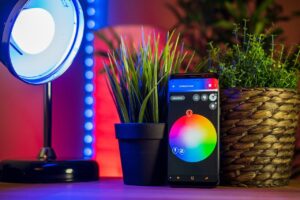
Smart lighting is one of the best starting points because the benefit is immediate. You can turn lights on and off from your phone, dim them, schedule them, or connect them to routines like sunrise, bedtime, or arriving home.
Smart bulbs are better for renters, small rooms, desk lamps, and people who want a simple setup. You usually install the bulb, connect it to the app, and start using it. Smart switches are better when you want one wall switch to control multiple bulbs or when family members still prefer using a physical switch.
A common beginner mistake is replacing every bulb in the house before testing the system. Start with one room, such as a bedroom, living room, or home office. If the app is easy, the brightness is good, and the connection stays stable, then expand to other rooms.
| Device Type | Best First Use | Beginner Caution |
|---|---|---|
| Smart bulb | Lamps, bedrooms, small rooms, color lighting | Wall switches can cut power and make the bulb unavailable |
| Smart switch | Ceiling lights and rooms used by multiple people | Installation may require electrical knowledge |
| Smart plug | Lamps, fans, coffee makers, simple appliances | Only use with devices that are safe to turn on remotely |
Add a Smart Plug Before Buying Expensive Devices
A smart plug is one of the cheapest and most practical smart home devices for beginners. It turns a normal outlet into a controllable outlet, making it useful for lamps, fans, holiday lights, and some small appliances.
The main advantage is flexibility. If you are not sure whether you really need a smart home setup, a smart plug lets you test schedules, remote control, and voice commands without replacing your existing devices.
Before using one, check the plug’s power rating and the device you plan to connect. Avoid using smart plugs with heaters, high-power appliances, medical devices, or anything that could become unsafe if turned on remotely or accidentally.
Choose Matter-Compatible Devices When Possible
Matter is a smart home standard created to make devices from different brands work more easily across major ecosystems. For beginners, this matters because it can reduce the risk of buying a device that only works well with one app or one assistant.
According to Google Home’s Matter guidance, Matter currently supports categories such as smart lighting, plugs, door locks, thermostats, blinds, security sensors, TVs, streaming video players, bridges, and wireless access points. That does not mean every feature works the same everywhere, but it is a strong sign of better long-term compatibility.
When shopping, look for the Matter logo, check whether the device needs a hub, and confirm support inside your chosen ecosystem. Matter is helpful, but it does not remove every compatibility issue. In many cases, the manufacturer’s app is still needed for advanced settings, firmware updates, or special features.
Consider a Video Doorbell or Security Camera Carefully
A video doorbell or indoor camera can be useful, but it should not be an impulse purchase. These devices involve privacy, storage, alerts, internet reliability, and sometimes subscription fees. For beginners, the best option is usually the one with clear controls, simple privacy settings, and transparent pricing.
A doorbell camera is useful if you receive deliveries, want to see who is at the door, or need motion alerts near the entrance. An indoor camera can help monitor pets, children, or specific rooms, but it should be placed with privacy in mind.
Before buying, check whether video recording is included or paid, how long clips are stored, whether local storage is available, and whether the camera supports two-factor authentication. A device that looks affordable can become expensive if the features you actually want require a monthly plan.
Buy a Smart Thermostat Only If Your Home Can Benefit From It
A smart thermostat can be one of the most valuable smart home upgrades, but it is not the best first purchase for everyone. It makes the most sense if your home uses central heating or cooling and you want better scheduling, remote temperature control, or energy-saving automation.
ENERGY STAR states that certified smart thermostats are independently verified for energy savings, and its guidance notes average savings of about 8% on heating and cooling bills, or around $50 per year. Actual savings depend on climate, comfort preferences, HVAC equipment, and how the thermostat is used.
Before buying one, confirm wiring compatibility, HVAC type, and whether professional installation is recommended. A smart thermostat is not like a smart bulb. If the wiring is wrong or the system is incompatible, the setup can become frustrating or even unsafe.
A Simple Buying Order for Beginners
The best smart home devices for beginners should be bought in a practical order. Start with control, then convenience, then security, then larger upgrades. This helps you avoid wasting money on devices that do not work together.
-
Choose your ecosystem first.
Decide whether you want to use Alexa, Google Home, Apple Home, Samsung SmartThings, or another platform. This choice affects which devices will be easiest to connect and control.
-
Buy one smart speaker or display.
Use it as your main control point. Test voice commands, routines, and app control before buying several devices.
-
Add smart lighting in one room.
Start with a bulb, switch, or plug in a room you use every day. This gives you a quick way to see whether smart home control actually fits your routine.
-
Use a smart plug for simple automation.
Try schedules for a lamp or fan. Avoid connecting anything that could create a safety risk if turned on without supervision.
-
Add security devices only after checking privacy and cost.
For cameras and doorbells, review subscriptions, storage options, account protection, and placement before buying.
-
Upgrade to thermostats, locks, or sensors when you know your needs.
These devices can be very useful, but they require more attention to compatibility, installation, and security.
Common Mistakes Beginners Should Avoid
One common mistake is buying devices from many different brands without checking whether they work in the same app. This can leave you with five apps, different settings, and routines that do not connect properly.
Another mistake is ignoring Wi-Fi quality. Smart devices depend on a stable network. If your router is weak or your home has dead zones, smart cameras, bulbs, and plugs may disconnect or respond slowly.
Beginners also often forget about subscriptions. Some cameras, doorbells, and security systems advertise attractive features, but cloud recording, advanced alerts, or extended history may require a paid plan. Always check the monthly cost before buying.
- Choose one main ecosystem before buying multiple devices.
- CheckCheck Matter, Wi-Fi, Thread, Zigbee, or hub requirements.
- Confirm whether the device works with your phone and voice assistant.
- Review subscription fees before buying cameras or doorbells.
- Use strong passwords and enable two-factor authentication when available.
- Start with one room before expanding to the whole home.
When to Get Professional Help or Support
Professional help is worth considering for smart switches, smart thermostats, door locks, wired cameras, and anything connected to electrical wiring or HVAC systems. If you are unsure about wiring, voltage, or installation steps, it is safer to contact a qualified installer.
You should also contact manufacturer support if a device repeatedly disconnects, fails to update, does not appear in your smart home app, or behaves differently from the official setup instructions. Resetting devices repeatedly without understanding the cause can make the setup more confusing.
For security-related devices, such as cameras, locks, and alarms, use official support pages and keep firmware updated. These products are not just convenience gadgets. They can affect privacy, access, and home safety.
Conclusion
The best smart home devices for beginners are usually a smart speaker or display, smart bulbs, smart plugs, and carefully chosen security devices. These products are simple enough to learn quickly, but useful enough to make a real difference in daily routines.
The smartest approach is to start small, choose compatible devices, and expand only after you understand what you actually use. Matter-compatible products, clear app support, good Wi-Fi, and transparent subscription terms can make the buying process much safer.
If you are unsure what to buy first, start with one room and one daily problem. A lamp that turns on automatically, a plug that follows a schedule, or a speaker that controls your lights is often a better beginning than a large, expensive setup.
FAQ
1. What smart home device should a beginner buy first?
A smart speaker or smart display is usually the best first device because it helps control other products later. If you want something cheaper, start with a smart plug or smart bulb in one room.
2. Do I need a hub for a beginner smart home?
Not always. Many Wi-Fi and Matter-compatible devices can work without a separate hub. However, some Thread, Zigbee, or advanced smart home setups may need a hub or border router, depending on the device and ecosystem.
3. Are smart home devices safe to use?
They can be safe when installed correctly and protected with good account security. Use strong passwords, enable two-factor authentication when available, update firmware, and be careful with cameras, locks, and devices connected to electrical systems.
4. Is Matter important for beginners?
Yes, Matter is useful because it can improve compatibility across major smart home platforms. Still, beginners should check the exact device features, supported ecosystem, and setup requirements before buying.
Official References
- Connectivity Standards Alliance — Matter smart home standard
- Google Home — Control your Matter devices with Google Home
- Amazon Alexa Developers — Connect your device to Alexa with Matter
- ENERGY STAR — Smart thermostat savings FAQ
The Connected Home Shield Editorial Team publishes practical, beginner-friendly content about smart home devices, home network security, IoT setup, automation, energy efficiency, privacy, and connected-home troubleshooting. Our guides are prepared for general educational purposes, with a focus on clear instructions, safer configurations, realistic expectations, and accessible information for users with different levels of technical experience.